Engagement OS Overview
An engagement is a specific, scoped piece of client work. The engagement workspace is where consultants spend most of their time. Everything in it is scoped to that one engagement — its evidence, assessments, gaps, workstreams, and deliverables.
Who can access
Members of the engagement team. People are added per engagement; firm-wide Organization Admins can see engagements across the firm.
The workspace layout
The engagement sidebar has two groups:
Lifecycle — the two phases the work moves through, plus the home:
| Item | Purpose |
|---|---|
| Overview | Engagement home: lifecycle rail, lineage, objectives, team, quick actions |
| Diagnose | Assess against frameworks; surface gaps |
| Deliver | Produce reports, decks, dashboards |
Turning gaps into workstreams/a roadmap and executing that work now happen within
Diagnose and Deliver — the former /plan and /execute routes redirect into them.
Workspace — cross-cutting tools available at any phase:
| Item | Purpose |
|---|---|
| Analysis | Causal & impact and Financial model (plan-gated). AI baseline is a Diagnose method; Ask the Data lives in Data & sources |
| Data & sources | Documents, connected sources, ontology, data collection, findings |
| Evidence Vault | Every data point used across the engagement, each linked to its source |
| Signals & Actions | AI-detected, grounded signals with assignable actions |
| Team | People on the engagement and their roles |
The lifecycle
| Phase | Goal | Page |
|---|---|---|
| Diagnose | Understand current state and find the gaps | Diagnose |
| Deliver | Package it for the client | Deliver |
Lineage: the thread through the work
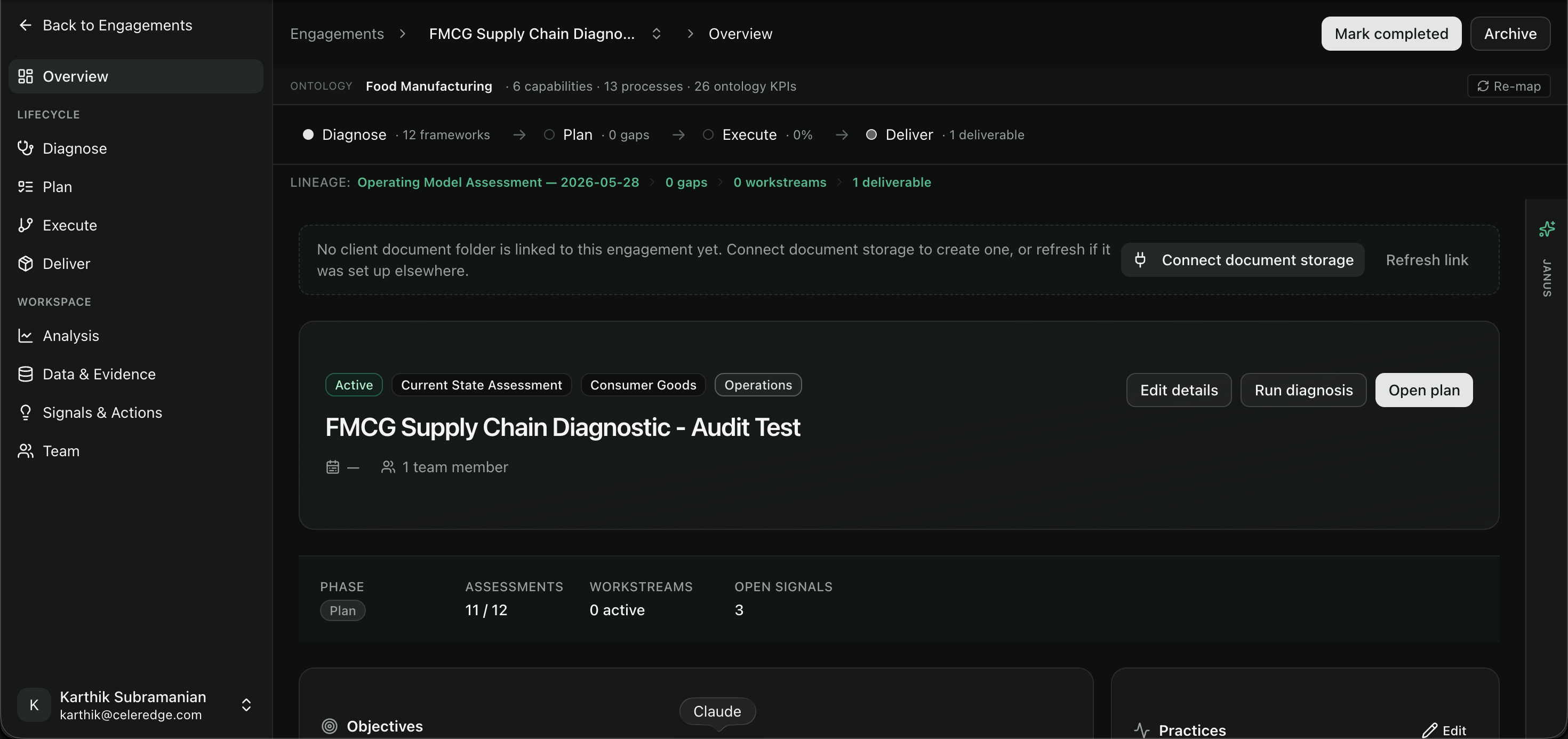
A persistent lineage strip connects the chain of work so nothing loses its context:
Because of lineage, a workstream always knows which gap (and which assessment dimension and practice) it came from, and a deliverable can be traced back to the evidence behind it. This is what lets you defend a recommendation to a client: every claim has a documented origin.
The Overview page
The engagement home shows:
- the lifecycle rail and lineage strip,
- the engagement's objectives,
- the practices it draws on,
- the team,
- a link to the client's document folder,
- and quick actions (Edit details, Run assessment, review gaps).
Related
- Creating and managing engagements
- Data & Evidence — feed the engagement with real data
- AI features — the intelligence layer over the engagement