Running Assessments
This page covers the mechanics of running an assessment — starting a run, watching it progress, and reviewing what it produces. For the conceptual picture, see Assessments Overview.
Who can access
Members of the engagement team.
Before you run
An assessment retrieves and reasons over the engagement's evidence, so quality depends on what's connected:
- Upload the client's documents and let them finish indexing.
- Optionally connect a database or run AI interviews for more coverage.
See Evidence Collection.
Running a run
- In Diagnose, open the Assessment method and pick a practice (Step 1 of 2), then a framework (Step 2 of 2).
- Check Data readiness — the panel shows the databases and other sources connected as evidence for the run. Add more in Data & sources if it's thin.
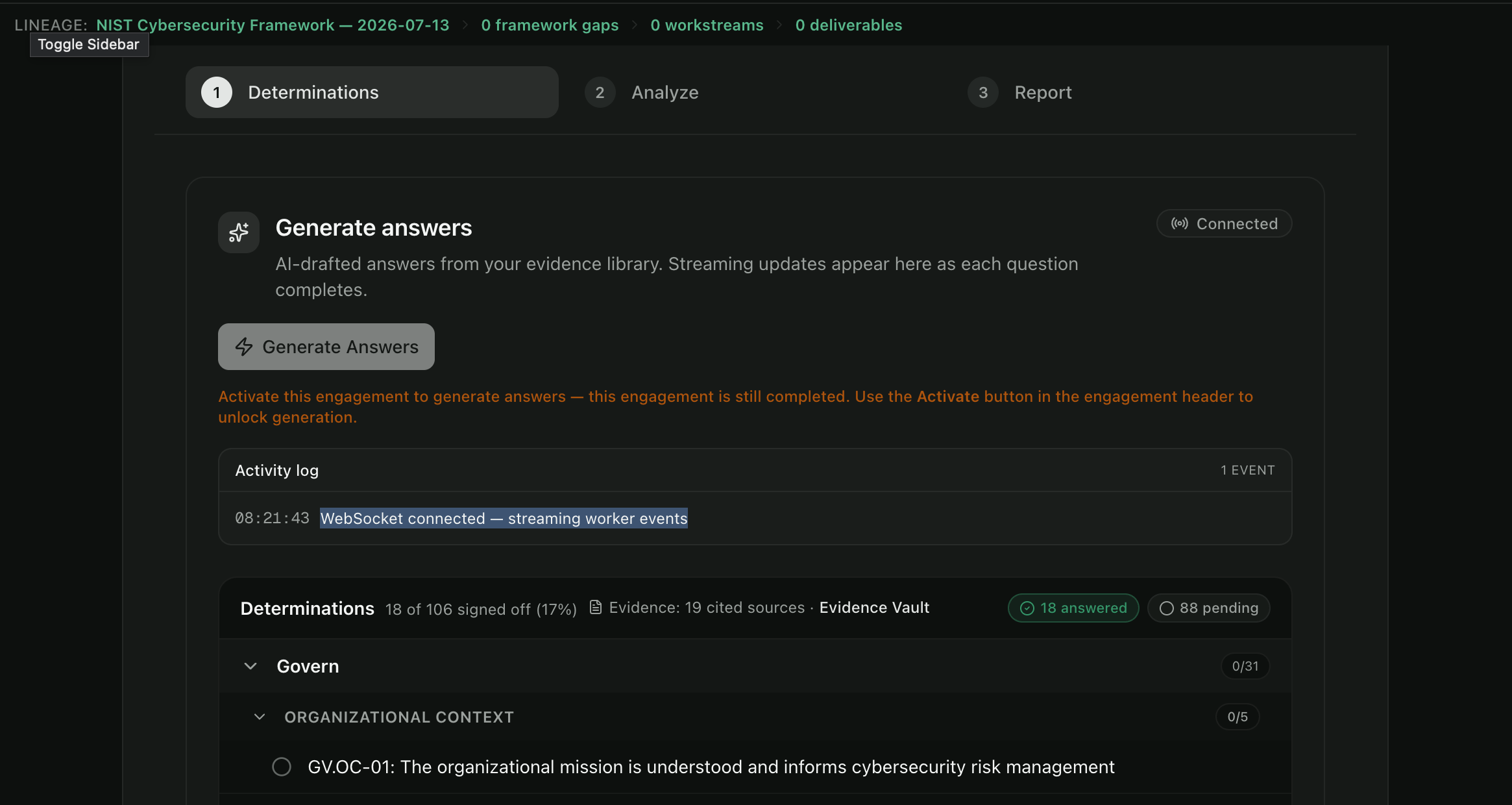
- Click Run Assessment / Generate Answers. AI drafts an answer for each framework question from your evidence, streaming into the page as each one completes.
- The run is tracked on a versioned run card and progresses through its stages:
| Stage | What's happening |
|---|---|
| Determinations | Drafting and grounding an answer for each framework question |
| Analyze | Scoring and identifying gaps |
| Report | Assembling the findings |
Runs are versioned — each run is preserved (latest run per framework, older runs kept and openable), so you can re-run and compare as evidence grows.
Reviewing answers
As answers stream in, review the Determinations, grouped by the framework's structure. A sign-off counter tracks progress (e.g. 18 of 106 signed off). Each answer shows:
- a confidence pill (Not grounded / Low / Medium / High),
- citations with source type, match score, and an excerpt,
- an "Open source" link into the Evidence Vault.
Click Accept answers once you're satisfied — accepting unlocks downstream analysis, materializes the evidence into the vault, and surfaces the resulting gaps for review in Diagnose.
Best practices
- Read confidence and citations, not just the answer. Accept on the strength of the evidence.
- Re-run after adding evidence. Versioning is there to let the assessment improve.
- Don't accept Not grounded answers as findings. They indicate an evidence gap to fill.
Common errors
| Symptom | Likely cause | What to do |
|---|---|---|
| Run won't start | Selected framework isn't fully prepared (compiled) | Pick another framework or contact your Celeredge admin |
| Many Not grounded answers | Thin evidence for those questions | Add targeted documents or run an AI interview, then re-run |
| Run seems stuck | Long-running background job | Refresh to see streamed progress; if it stalls, start a new versioned run |